Delay nulling (notch filter)
How it works
In this mode the frequency data of each timestep/baseline is Fourier transformed to form a delay spectrum. jolly-roger will null the delays towards some nominated sky-direction. The expected delay of a bright source can be computed by examining the difference between the w-terms of the phased direction and the source direction. Multiple sky-directions may be set in a single jolly-roger invocation.
Acceleration
The computation part of jolly-roger can be spread across multiple cores through data partitioning. This is mostly a best effort basis for the moment, but testing has shown upwards a 2-times speed up. On the command line the --max-workers N argument is used to set the number of threads (not processes) to use, where each thread is managing on compute operation against a chunk of rows.
Should this be used it is suggested to lower the --chunk-size to avoid excessive memory usage. Acceleration here relies on numpy operations releasing the GIL, so full CPU saturation is unlikely. Further, reading/writing through casacore is limited to the main thread, so can also act as a bottleneck.
Brief testing suggests that smaller batch sizes is preferable over larger when using N > 4 number of workers, but this has not been thoroughly explored.
Example
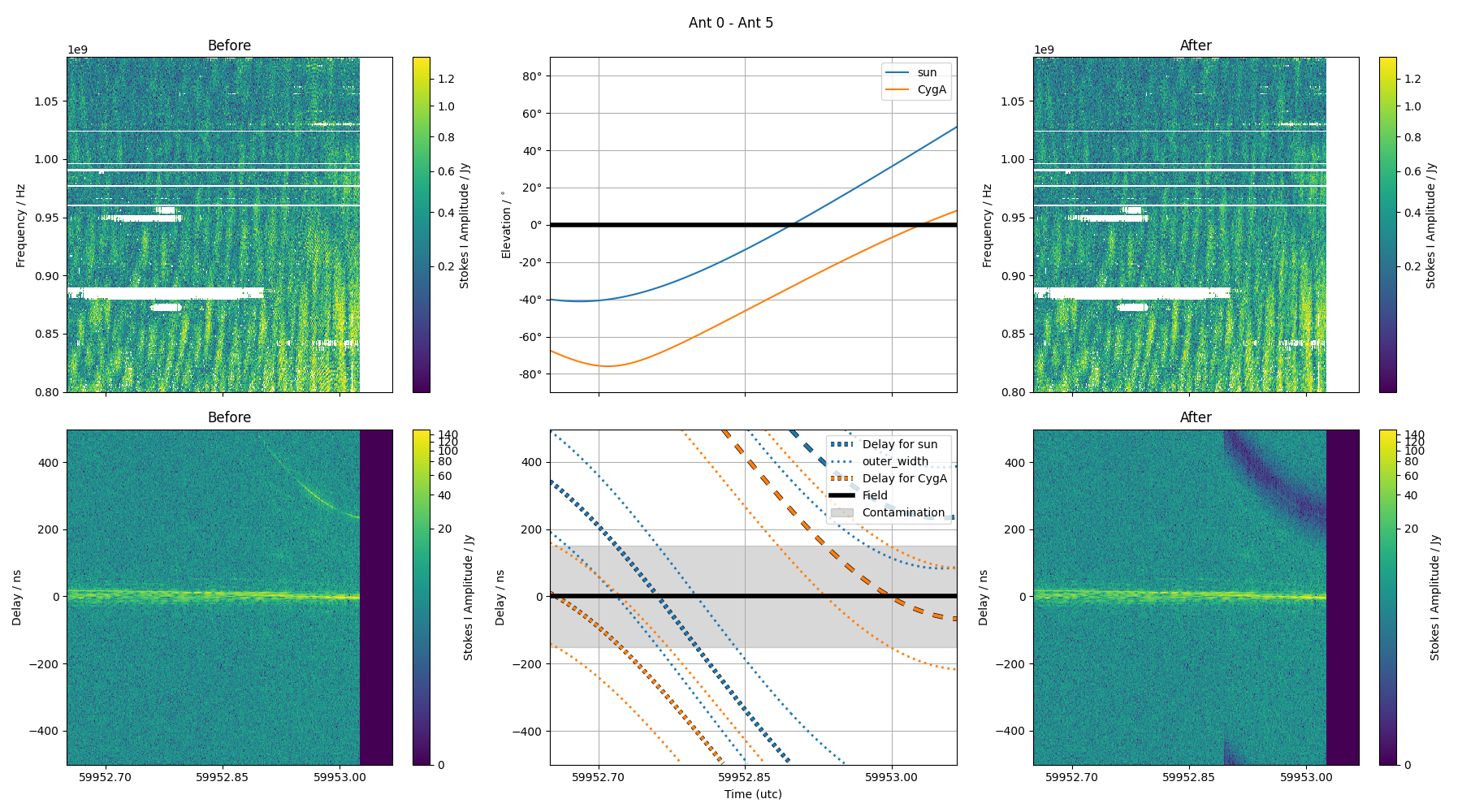
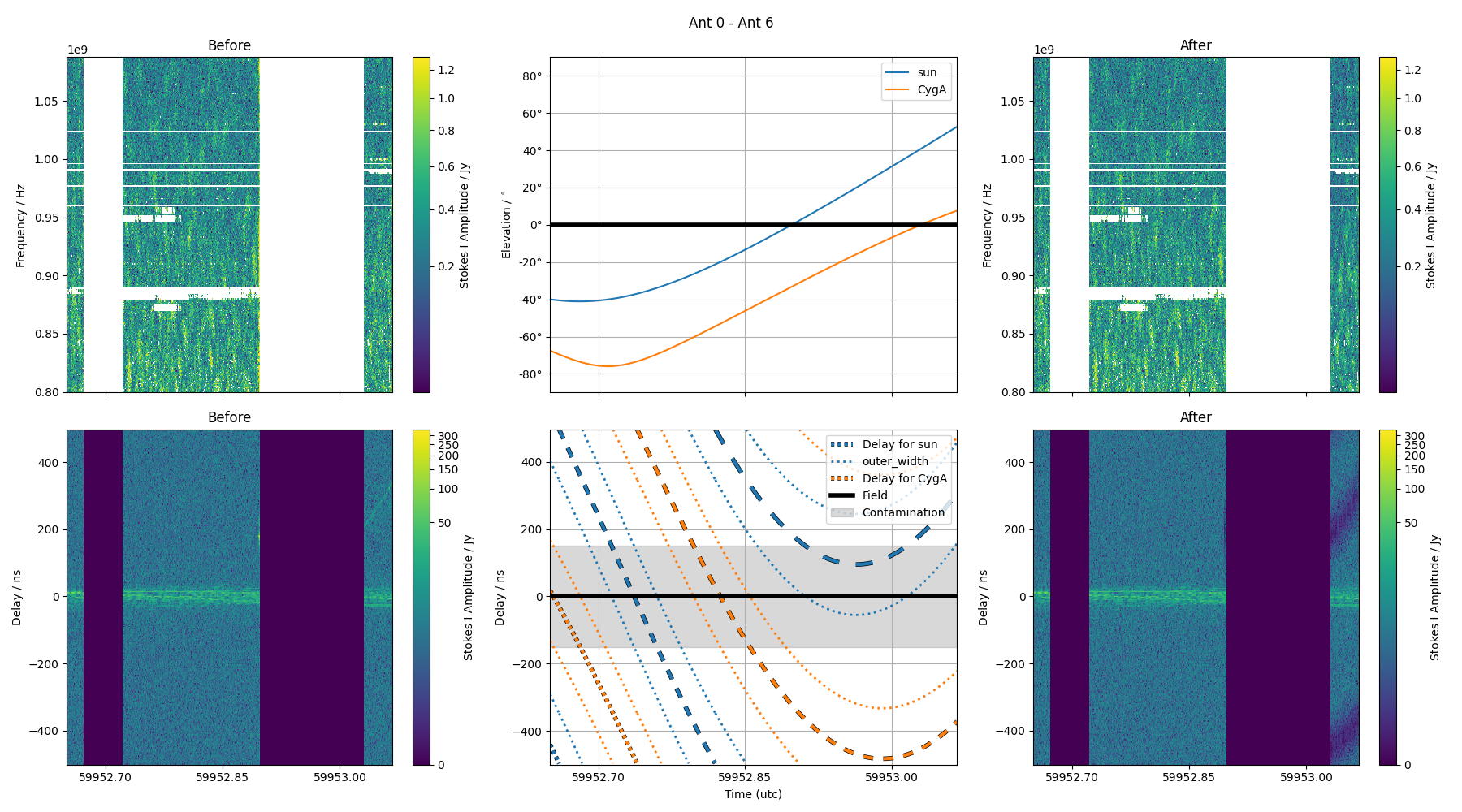
The nulling approach can be accessed through jolly_tractor. Examples of its application are below. The left and right columns indicate the before and after of the nulling procedure (here nulling towards the Sun’s sky position). The top row shows the dynamic sopectrum (time vs frequency) while the bottom highlight the time vs delay of the data.
Sunrise was approximately in the middle of this observation, as indicated by the sudden excess power seen in the top left figure.
The red dashed lines in the lower panel represents the delay of the Sun as derived from the geometry of the array, with the length of each dash represents the Nyquist zone (i.e. how aliased the source appears in delay space). Nulling can be deactivated if the Nyquist zone of the object is high enough to effectively mean no contribution (typically the case for longer baselines).
Should the source cross over a delay of 0 then that timestep will be flagged, as the intermixed components can not be separated, and nulling would have an adverse effect of the direction being observed.
Baseline ak01 to ak06
Baseline ak01 to ak07
Tukey Parameterisation
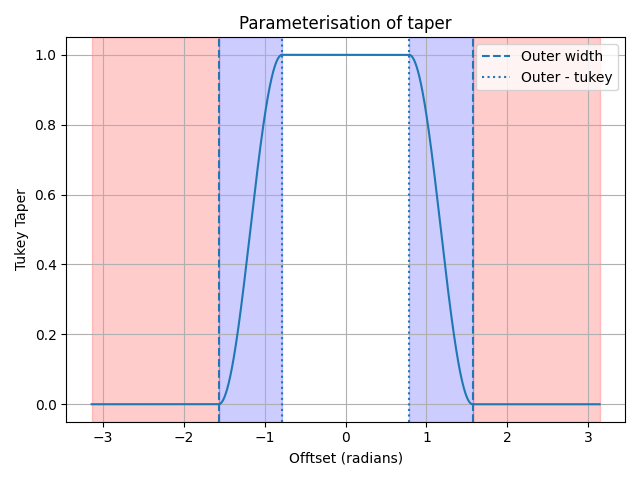
Internal jolly-roger uses a tukey window function to smoothly modify visibilities. This window function defines a region that smoothly changes from 1.0 to 0.0. We should in the above figure this specific window is parameterised in jolly-roger.
The outer_width parameter defines a boundary beyond which the window is all 0.0s. The tukey_width defines the interval over which the window function transitions from 1.0 to 0.0. This transition is described as 1 - cos. Hence, a smaller outer_width will taper more of the data, and a smaller tukey_width produces a window that transitions quicker.
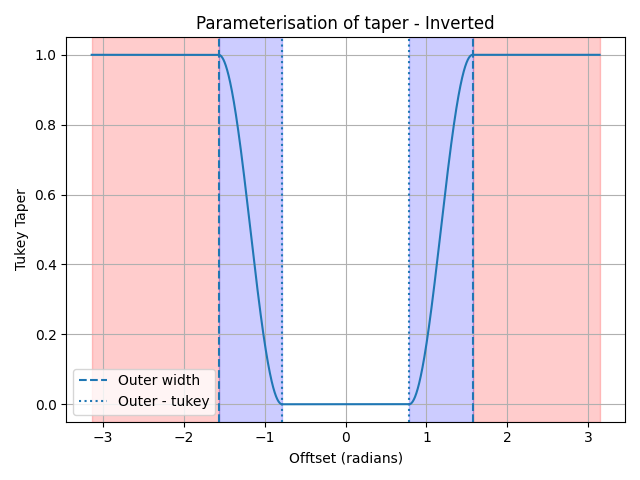
If the --taper-towards-object argument is used the tukey taper is inverted to behave like a notch filter. So a smaller outer_width will preserve more data. See the below figure.
CLI
Run the Jolly Roger Tractor
usage: jolly_tractor [-h] {tukey} ...
Positional Arguments
- mode
Possible choices: tukey
Sub-commands
tukey
Perform a simple Tukey taper across delay-time data
jolly_tractor tukey [-h]
                    [--target-objects TARGET_OBJECTS [TARGET_OBJECTS ...]]
                    [--outer-width-ns OUTER_WIDTH_NS]
                    [--tukey-width-ns TUKEY_WIDTH_NS]
                    [--data-column DATA_COLUMN]
                    [--output-column OUTPUT_COLUMN] [--copy-column-data]
                    [--dry-run] [--make-plots]
                    [--number-of-plots NUMBER_OF_PLOTS] [--overwrite]
                    [--chunk-size CHUNK_SIZE]
                    [--elevation-cut-deg ELEVATION_CUT_DEG]
                    [--ignore-nyquist-zone IGNORE_NYQUIST_ZONE]
                    [--reverse-baselines] [--flip-uvw-sign]
                    [--max-workers MAX_WORKERS]
                    [--compare-to-field COMPARE_TO_FIELD] [--auto-size]
                    [--nth-sidelobe-null NTH_SIDELOBE_NULL] [--reweight]
                    [--weight-column WEIGHT_COLUMN] [--guard-field]
                    [--guard-field-fraction GUARD_FIELD_FRACTION]
                    [--object-minimum-flux OBJECT_MINIMUM_FLUX]
                    ms_path
Positional Arguments
- ms_path
The measurement set to process with the Tukey tractor
Inputs for TukeyTractorOptions
- --target-objects
The target object to apply the delay towards.
Default:
('sun',)- --outer-width-ns
The start of the tapering in nanoseconds
Default:
10- --tukey-width-ns
The width of the tapered region in nanoseconds
Default:
10- --data-column
The visibility column to modify
Default:
'DATA'- --output-column
The output column to be created with the modified data
Default:
'CORRECTED_DATA'- --copy-column-data
Copy the data from the data column to the output column before applying the taper
Default:
False- --dry-run
Indicates whether the data will be written back to the measurement set
Default:
False- --make-plots
Create a small set of diagnostic plots. This can be slow.
Default:
False- --number-of-plots
The number of output plots to make. Defaults to 10.
Default:
10- --overwrite
If the output column exists it will be overwritten
Default:
False- --chunk-size
Size of the row-wise chunking iterator
Default:
1000- --elevation-cut-deg
The elevation cut-off for the target object in degrees. Defaults to -1 degrees.
Default:
-1.0- --ignore-nyquist-zone
Do not apply the tukey taper if object is beyond this Nyquist zone
Default:
2- --reverse-baselines
Reverse baseline ordering
Default:
False- --flip-uvw-sign
Flip the sign of UVWs (required for LOFAR)
Default:
False- --max-workers
The number of compute processes to establish. Each process gets chunk_size of rows. If max_worker==1 all work is performed in main thread.
Default:
1- --compare-to-field
Compare the source brightness in delay space to the field. If the source is fainter than the field multiplied by this factor, do not taper. Defaults to None.
- --auto-size
Automatically size the outer width of the tukey taper based on the data
Default:
False- --nth-sidelobe-null
Null up to the N’th sidelobe. Only used in auto_size mode. Defaults to None.
- --reweight
Attempt to identify a WEIGHT-like column and rescale to indicate modified data. Defaults to False.
Default:
False- --weight-column
The name of the WEIGHT-like column. If None when rewrite is True the WEIGHT-like column will be searched for. Defaults to None.
- --guard-field
If True derive a region around the delay=0 spectrum to protect the field-of-view/
Default:
False- --guard-field-fraction
The attenuation level of the main lobe to guard to, and should be in the range (0, 1). Values closer to zero correspond to a larger field-of-view, and hence a larger guard band in delay space.
Default:
0.1- --object-minimum-flux
The minimum absolute flux an object should have (as measured in delay space in Jy) for it to be nulled